
What is Speed Reading?
The average reading speed is around 200-250 words per minute (wpm). When training your speed reading skill, you can become two to three times as fast. One important aspect, besides reading speed, is comprehension, which can decline steeply if you rely solely on speed reading and no comprehension techniques.¹
Small hint for neurodiverse people, as some of them might not read through this entire text: Check out the recommendations below.
The Issue with Regular Reading
Most people will read every single word and subvocalize it in their mind, i.e., read it out loud with their inner narrator voice. This can be a preferred way of reading if you’re doing some leisure reading, but not if you’re trying to extract information efficiently from a given text. This approach has a few drawdowns. The first one is that your eyes need a bit of time to adjust to whatever you’re looking at if you move them. Thus, moving them more often makes you lose more time on adjustments than necessary. Second, subvocalization is an unnecessary step. For you to subvocalize a word, it requires that you’ve already comprehended it, making the subvocalization purely optional.¹
In my personal interpretation, speed reading focuses mainly on getting rid of any unnecessary but common friction you’d experience while reading. You don’t need some 1 in 1.000 super-human brain for this, just some regular practice. I’d also argue that comprehension is much more important than your reading speed. Personally, depending on what text I’m reading, my reading speed varies between 300-600 wpm, usually hovering around 450-500 wpm. This mainly depends on information density and text complexity. The denser the information, the slower my reading speed, because I need to put more effort into comprehension.
Increase your Reading Speed
Use Peripheral Vision
You might be surprised how much of your peripheral vision you’re able to actively perceive. A nice way of showing this is with a Schulte Table.¹ Side Note 2026-07-24: The Wikipedia page for this is only available in 4 languages, not including English. The page on Speed Reading has 31, in comparison.
Schulte Table Exercise
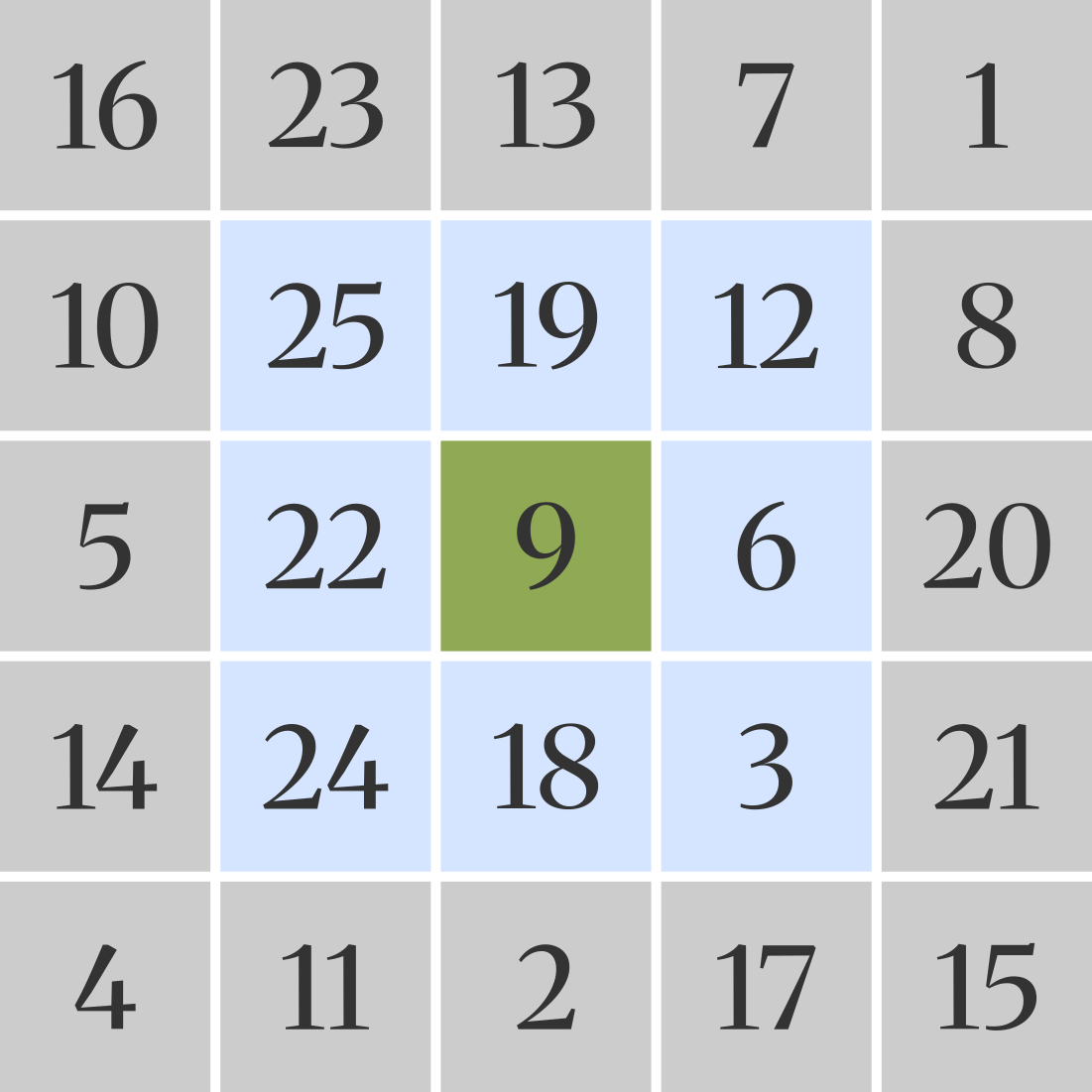
Please read the instructions before looking at the grid below!
I created a Schulte table for you to see the effect for yourself. For this exercise, keep your eyes centered on the green field with the 9 at all times. Don’t let your eyes wander to any of the other fields. While your eyes are centered on the green field, first try identifying the numbers on the blue fields, then those on the grey fields. Stay honest to yourself and don’t let your eyes jump. Depending on what screen you’re doing this on, you might want to zoom in or out a bit. You can right-click or press-hold the image to open it in a new tab.
Expand for Schulte Table
Peripheral Reading Exercise
If you were able to read all the numbers on the blue fields, that’s already pretty good. If you were able to identify most or even all of the numbers on the grey fields, your eyes are probably already well-trained for peripheral reading. Let’s take this a step further by reading some actual text. In the following examples, focus your eyes on the bold words only. In the easy example, every 3rd word is bold, and every 5th or 7th word in the medium and hard examples, respectively. Read the non-bold words from your peripheral vision only.
Easy Example
This is a small reading example where I have to make up some words because this should be optional. So I can’t put any actual content in here, because then you might skip the exercises and miss out on this.
Medium Example
This will probably be a bit more challenging as you’ll now have to read 2 words from your peripheral vision at a time. This is my personal comfort zone, but only for as long as the words don’t get too long.
Hard Example
If you can read this, then your peripheral reading skill is truly quite advanced.
It doesn’t matter at what difficulty you’ve been able to use your peripheral vision for reading. What’s important is that you probably succeeded in reading words from your peripheral vision. You might have noticed that most books, papers, and articles you read don’t have a strict “make every nth word bold”-policy, which is probably for the better. When reading a regular text, you’ll have to get used to making these jumps yourself, skipping a couple of words your eyes focus on every time. Thus, instead of looking at every word, you’ll start looking at every nth word all by yourself. I’ve deliberately chosen this technique first so you can try applying it while reading the rest of the speed reading techniques.
Stop Subvocalization
By now, you might still be reading with that narrator voice inside your head. Due to the way we process language, we cannot entirely eliminate subvocalization, but instead minimize its use. Try vocalizing as few words as possible in your mind, still registering and comprehending the others.¹ This is absolutely necessary for reaching certain wpm reading speeds, unless you’d like your inner narrator to turn into a doubletime rapper. From my personal experience, the best way of practicing this is by only subvocalizing some key words while your peripheral vision gathers and comprehends context. So in your head, the following sentence:
“Subvocalization has the negative effect of slowing down your reading speed” could be subvocalized in your head as “subvocalization effect slowing reading”. You’ve read 11 words and subvocalized 4.
Your brain is capable of recognizing symbols such as words in a roughly 1/100th of a second¹, so if you apply some quick judgement, you might be able to distinguish keywords (“subvocalization”, “effect”, “reading speed”, …) from filler words (“has”, “the”, “of”, …) and additional context (“negative”, “slowing”, “your”, “speed”, …). What you consider keywords, context, and filler words will be your call. What matters in the end is that you have some kind of importance spectrum and try vocalizing only important words, not slowing yourself down by vocalizing filler words.
Further Recommendations
To further increase your reading speed and improve your comprehension as well, take a look at the SQ3R method!
Bionic Reading
Bionic Reading is the new kid on the block. From my research, it was discovered by Renato Casutt in 2022, so it hasn’t been around for long. But for me personally, it’s been a game changer. Just read the following paragraph and see if it works for you.
This is an example of bionic reading. Are you able to read this faster than other texts, without trying to? When I first discovered this, I was amazed. It both boosted my reading speed and comprehension, and I’ve been trying to use bionic reading wherever possible since. It feels like cheating, and it sucks that most of the tools available for this are either locked behind a paywall, insufficient, or generally limited. Like, how cool would it be to just have some reliable and free PDF converter or even a PDF reader that will apply this effect to all text? Don‘t get me wrong, there are some quite nice tools out there, and I encourage you to take a look at them. I just haven’t found a truly great, free one that blew me away.
If this worked for you, make sure to check out Renato’s website. If you’re wondering why this website doesn’t offer bionic reading functionality, take a look at the future list.